Reading time: 25 min
AI Coding Agents for Frontend: GSAP, React, Next.js, and Animation Bugs
A practical frontend workflow for using AI coding agents with GSAP, React, Next.js, ScrollTrigger, hydration bugs, mobile layout, resize issues, and visual QA.
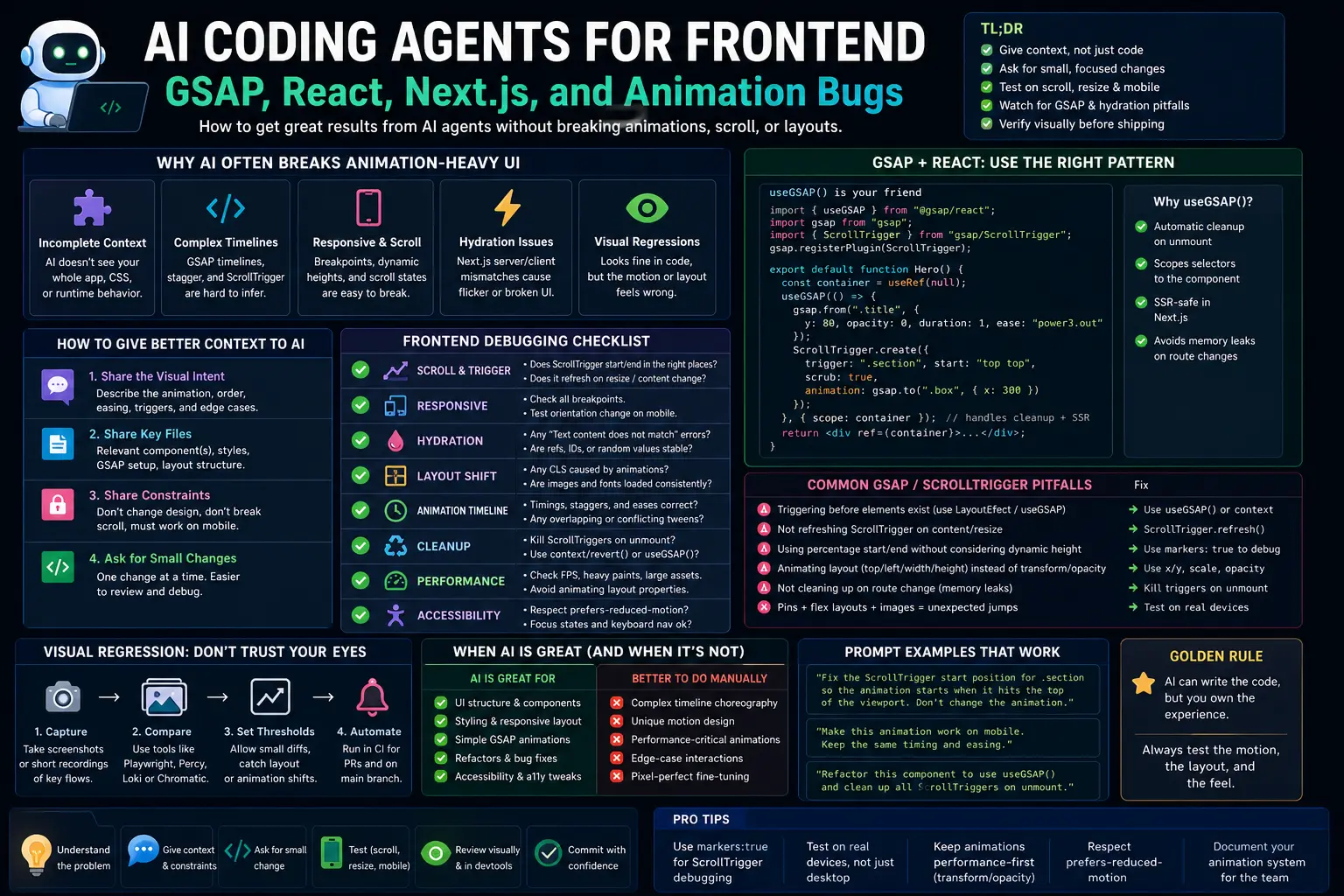
AI coding agents are good at writing React components. They are much worse at understanding how a complex animation-heavy page feels when you scroll, resize, hover, wait for a video to load, or open it on a real phone.
That is why frontend work with GSAP, React, and Next.js needs a different AI workflow.
A coding agent can help with component structure, refactors, TypeScript, state, tests, cleanup, and repeated animation patterns. But if you ask it to “make the hero smoother” or “fix the animation,” it may change the wrong CSS, break ScrollTrigger timing, create hydration issues, or remove a small layout detail that made the page feel premium.
This guide explains how to use AI coding agents for frontend projects with GSAP, React, Next.js, ScrollTrigger, and animation-heavy UI. We will cover why agents break animations, how to give context, how to ask for small changes, GSAP/ScrollTrigger pitfalls, hydration issues, resize/mobile QA, visual regression, debugging prompts, and when it is better to do the animation manually.
Why Animation-Heavy UI Is Hard for AI Agents
AI agents work from text, files, commands, and sometimes screenshots. Animation-heavy frontend work depends on timing, feel, layout, scroll physics, browser behavior, and visual continuity.
That creates a gap.
The code may look correct, but the page may still feel wrong:
- the animation starts too early;
- ScrollTrigger pins the wrong section;
- content jumps on refresh;
- the layout breaks on mobile;
- the timeline runs twice in development;
- cleanup does not happen on route change;
- resize changes trigger positions;
- hydration warnings appear;
- Lenis or smooth scrolling conflicts with ScrollTrigger;
- the agent changes CSS that looked unused but controlled the visual rhythm.
AI agents are especially likely to break animation-heavy UI when they do not know the intended visual behavior. Code alone is often not enough. The agent needs context about what the animation should feel like.
The Frontend Rule: Small Diffs, Visual Checks
For frontend animation work, the best rule is simple:
txtCopyAsk for small diffs and verify visually.
Do not ask the agent to redesign a whole hero, rewrite all animations, and fix mobile in one pass.
Instead, split the work:
- isolate the bug;
- identify the component;
- describe the visual behavior;
- change one animation or layout rule;
- test desktop;
- test mobile;
- test resize;
- test route changes;
- review the diff.
Animation bugs become expensive when the agent changes five things at once. Small diffs make the cause visible.
Give the Agent Visual Intent, Not Just Code
A weak prompt:
txtCopyFix the GSAP animation.
A better prompt:
txtCopyThe hero text should fade in after the video is visible. On desktop, the headline should move up 24px while fading from 0 to 1 opacity. On mobile, it should only fade in and should not move vertically. The animation should run once on page load and should clean up on unmount.

Inspect `Hero.tsx` and `Hero.module.css`. Do not change unrelated sections. Use the existing GSAP pattern in `AnimatedSection.tsx` if possible.
The better prompt gives the agent visual intent, device differences, scope, files, and an existing pattern.
For animation work, include:
- what should move;
- when it should start;
- how long it should take;
- what should happen on mobile;
- whether it repeats;
- whether scroll controls it;
- which files are relevant;
- what should not change.
This is context engineering for frontend animation.
Use the Existing Animation Pattern
Most animation bugs happen when the agent invents a new pattern instead of following the project’s existing one.
Before editing, ask the agent to inspect a working animation:
txtCopyBefore editing, inspect one existing component where GSAP and ScrollTrigger work correctly. Summarize the pattern and reuse it. Do not invent a new GSAP setup unless the existing pattern cannot handle this case.
This matters because React + GSAP usually needs consistent patterns for refs, scoping, cleanup, plugin registration, and route changes.
Good project instructions:
mdCopy## Frontend animation rules
- Use `@gsap/react` and `useGSAP()` for component animations.
- Scope selectors to the component root ref.
- Do not target global class names unless required.
- Clean up animations on unmount.
- Keep mobile animation simpler than desktop.
- Do not mix layout refactors with animation timing changes.
Put rules like this in AGENTS.md, CLAUDE.md, Cursor rules, or a frontend animation skill.
GSAP + React: Use Cleanup-Friendly Patterns
GSAP’s official React resources recommend the useGSAP() hook, which is designed to follow React best practices for animation cleanup. The docs also note that it is safe to use in Next.js or other SSR environments when used in client-side components because it uses an isomorphic layout-effect technique.
A clean component pattern:
tsxCopy"use client";

import { useRef } from "react";
import gsap from "gsap";
import { useGSAP } from "@gsap/react";
import styles from "./Hero.module.css";

gsap.registerPlugin(useGSAP);

export function HeroTitle() {
  const rootRef = useRef<HTMLDivElement | null>(null);

  useGSAP(
    () => {
      gsap.fromTo(
        `.${styles.title}`,
        { opacity: 0, y: 24 },
        { opacity: 1, y: 0, duration: 0.8, ease: "power3.out" }
      );
    },
    { scope: rootRef }
  );

  return (
    <section ref={rootRef} className={styles.hero}>
      <h1 className={styles.title}>Build Motion Systems</h1>
    </section>
  );
}
The important details:
- client component;
- root ref;
- scoped selector;
useGSAP();- no global class guessing;
- no browser-only logic during server render.
A coding agent should follow this pattern unless your project uses a different one.
Next.js Hydration Issues
Next.js hydration errors happen when the server-rendered HTML does not match what React renders on the client. The official Next.js docs explain that the initial client render should match the server HTML, and browser-only differences should be moved into client-side effects.
Animation code often causes hydration problems when:
- it reads
windowduring render; - it uses
Math.random()orDate.now()in JSX; - it changes initial markup before hydration;
- it conditionally renders different elements on server and client;
- it depends on viewport size during server render;
- it mutates body/html styles in a way React does not expect;
- it runs animation setup outside a client-only component.
Safe rule:
txtCopyRender stable markup first. Run animation after the component mounts.
Bad pattern:
tsxCopyexport function Hero() {
  const isMobile = window.innerWidth < 768;

  return <h1>{isMobile ? "Mobile" : "Desktop"}</h1>;
}
Better pattern:
tsxCopy"use client";

import { useEffect, useState } from "react";

export function HeroLabel() {
  const [isMobile, setIsMobile] = useState(false);

  useEffect(() => {
    const media = window.matchMedia("(max-width: 767px)");
    const update = () => setIsMobile(media.matches);

    update();
    media.addEventListener("change", update);

    return () => media.removeEventListener("change", update);
  }, []);

  return <span>{isMobile ? "Mobile" : "Desktop"}</span>;
}
Even better, when possible, use CSS media queries for layout and keep React markup stable.
ScrollTrigger Pitfalls AI Agents Miss
ScrollTrigger is powerful because it connects animation to scroll position. It is also easy to misuse.
Common pitfalls:
- triggers use global selectors and affect multiple sections;
- trigger start/end values are guessed;
- pinned sections change page height unexpectedly;
- images or videos load after ScrollTrigger calculates positions;
- cleanup does not happen on route change;
ScrollTrigger.refresh()is missing after layout changes;- mobile uses the same pinning as desktop;
- Lenis or another smooth-scroll library is not synchronized;
- the agent creates multiple triggers on re-render.
A safer ScrollTrigger pattern:
tsxCopy"use client";

import { useRef } from "react";
import gsap from "gsap";
import { ScrollTrigger } from "gsap/ScrollTrigger";
import { useGSAP } from "@gsap/react";
import styles from "./FeatureSection.module.css";

gsap.registerPlugin(ScrollTrigger, useGSAP);

export function FeatureSection() {
  const rootRef = useRef<HTMLElement | null>(null);

  useGSAP(
    () => {
      const cards = gsap.utils.toArray<HTMLElement>(`.${styles.card}`);

      cards.forEach((card) => {
        gsap.fromTo(
          card,
          { opacity: 0, y: 32 },
          {
            opacity: 1,
            y: 0,
            duration: 0.7,
            ease: "power2.out",
            scrollTrigger: {
              trigger: card,
              start: "top 80%",
              once: true,
            },
          }
        );
      });
    },
    { scope: rootRef }
  );

  return (
    <section ref={rootRef} className={styles.section}>
      <article className={styles.card}>One</article>
      <article className={styles.card}>Two</article>
      <article className={styles.card}>Three</article>
    </section>
  );
}
This pattern scopes the query to the component and creates predictable triggers per card.
Ask for One Animation Change at a Time
Animation bugs are hard to review when the agent changes timing, layout, CSS, markup, and ScrollTrigger settings in one diff.
Bad request:
txtCopyMake this hero feel more premium and fix mobile.
Better requests:
txtCopyChange only the headline entrance timing. Do not edit CSS layout or ScrollTrigger settings.
Then:
txtCopyNow adjust mobile so the headline fades in without vertical movement. Do not change desktop behavior.
Then:
txtCopyNow check whether ScrollTrigger needs refresh after the hero video loads. Do not change animation timing.
The smaller the request, the easier the review.
A good agent instruction:
txtCopyFor animation work, change one dimension at a time: timing, transform, trigger, layout, or responsive behavior. Do not change multiple dimensions unless asked.
Debugging Scroll and Resize Bugs
Scroll/resize bugs are especially tricky because they depend on viewport size, media loading, and layout calculations.
A useful debugging prompt:
txtCopyDebug the ScrollTrigger resize bug. Do not edit yet.

Check:
- which elements are pinned;
- whether images/videos load after triggers are created;
- whether `ScrollTrigger.refresh()` is needed;
- whether triggers are cleaned up on unmount;
- whether mobile should disable pinning;
- whether the smooth-scroll library needs ScrollTrigger synchronization.

Return a diagnosis and a minimal fix plan.
Manual QA checklist:
- load at top of page;
- reload halfway down the page;
- resize desktop wide to narrow;
- rotate mobile portrait/landscape;
- scroll quickly;
- scroll slowly;
- navigate away and back;
- open devtools and throttle network;
- test after images/videos load;
- test with reduced motion if supported.
Agents can suggest fixes, but a human should still feel the page.
Mobile Animation Rules
Desktop animation often does not translate to mobile.
Mobile needs:
- fewer pinned sections;
- shorter distances;
- less parallax;
- fewer simultaneous transforms;
- reduced scrub complexity;
- safer viewport units;
- less reliance on hover;
- careful handling of address-bar resize;
- performance-friendly transforms.
Tell the agent mobile behavior explicitly:
txtCopyOn mobile under 768px:
- disable pinning;
- remove horizontal scroll effects;
- keep fade-in only;
- reduce y movement from 32px to 12px;
- do not animate width, height, top, or left;
- preserve content order and accessibility.
Do not let the agent assume that desktop animation should simply scale down.
Layout vs Animation: Keep Them Separate
Agents often fix animation by changing layout. Sometimes that is necessary, but it should be intentional.
Separate these layers:
- markup structure;
- layout CSS;
- animation CSS state;
- GSAP timeline;
- ScrollTrigger settings;
- responsive rules;
- reduced-motion behavior.
A review question:
txtCopyDid the agent change layout to fix an animation bug? If yes, was that necessary?
For premium landing pages, tiny layout changes matter. A 12px spacing change can break the visual rhythm even if the code still compiles.
Ask the agent to label the type of change:
txtCopyBefore editing, classify the fix as one of: layout change, animation timing change, trigger change, cleanup change, or responsive behavior change. Do not mix categories without approval.
Visual Regression Matters More Than Unit Tests
Unit tests are useful for utilities and state. They are weak for motion quality.
For animation-heavy frontend, use visual QA:
- screenshots before/after;
- short screen recordings;
- Playwright screenshots;
- Chromatic or visual regression tools if your team uses Storybook;
- manual review on real devices;
- Lighthouse/performance checks for heavy pages.
A practical Playwright-style screenshot test can catch layout breaks:
tsCopyimport { test, expect } from "@playwright/test";

test("hero layout is stable on desktop", async ({ page }) => {
  await page.goto("/");
  await expect(page.locator("[data-testid='hero']")).toHaveScreenshot("hero-desktop.webp");
});

test("hero layout is stable on mobile", async ({ page }) => {
  await page.setViewportSize({ width: 390, height: 844 });
  await page.goto("/");
  await expect(page.locator("[data-testid='hero']")).toHaveScreenshot("hero-mobile.webp");
});
Visual regression will not tell you if the animation feels premium, but it can catch layout shifts and broken responsive states.
Performance Checks for Animation Bugs
Animation bugs are often performance bugs.
Watch for:
- animating
width,height,top,left, or expensive filters; - too many ScrollTriggers;
- heavy blur/backdrop-filter usage;
- large videos without fallback strategy;
- huge SVGs animated on scroll;
- layout thrashing;
- missing cleanup;
- unnecessary React state updates during scroll;
- repeated timeline creation.
Prefer animating:
transform;opacity;- CSS variables carefully;
- GPU-friendly properties.
Ask the agent:
txtCopyReview this animation for performance. Do not edit yet. Flag any layout-triggering properties, excessive ScrollTriggers, missing cleanup, repeated timeline creation, or React state updates during scroll.
For complex pages, performance review should happen before adding more animation.
Reduced Motion and Accessibility
AI agents often ignore reduced-motion users unless instructed.
Add a rule:
txtCopyRespect `prefers-reduced-motion`. If reduced motion is enabled, remove scrub/pin/parallax and keep content visible without animation dependency.
Example pattern:
tsxCopyconst reduceMotion = window.matchMedia("(prefers-reduced-motion: reduce)").matches;

if (reduceMotion) {
  gsap.set(`.${styles.title}`, { opacity: 1, y: 0 });
  return;
}
Also check:
- content is readable without animation;
- focus order still makes sense;
- keyboard users are not trapped in pinned sections;
- animation does not hide important text;
- buttons are clickable after transforms;
- ARIA is not used to compensate for broken markup.
A premium page still needs to be usable.
When to Let AI Help
AI agents are helpful for:
- converting repeated animation patterns into reusable hooks;
- adding cleanup;
- scoping selectors;
- writing TypeScript types;
- splitting a large component;
- adding reduced-motion behavior;
- finding missing dependencies in
useEffectoruseGSAPconfig; - writing Playwright visual checks;
- creating QA checklists;
- reviewing diffs for risky animation changes.
Good agent task:
txtCopyCreate a reusable `useFadeInOnScroll` hook based on the existing pattern in `FeatureSection.tsx`. Use `useGSAP()`, scope selectors, support reduced motion, and do not change existing component markup.
This is structured and reviewable.
When to Do It Manually
Do animation manually when:
- the task is about taste, not correctness;
- the motion needs hand-tuned easing;
- the problem depends on visual feel;
- the layout is highly custom;
- the hero section is brand-critical;
- the page uses WebGL, shaders, canvas, or complex SVG morphing;
- there is no clear existing pattern;
- the agent keeps producing broad diffs.
Manual work does not mean no AI. You can still use AI for analysis, cleanup, tests, and review.
Better approach:
txtCopyI will tune the animation manually. Review this GSAP timeline for cleanup, ScrollTrigger risk, mobile behavior, and reduced-motion support. Do not rewrite the animation.
That keeps the creative control with the human while using AI for engineering safety.
Debugging Checklist
Use this checklist when an AI agent changes frontend animation code:
mdCopy## Frontend Animation Review Checklist

### Scope
- [ ] The diff changes only the requested component or animation.
- [ ] Layout changes are intentional and explained.
- [ ] No unrelated CSS was modified.

### React / Next.js
- [ ] Animation code runs only in client components.
- [ ] No browser-only values are read during server render.
- [ ] Hydration warnings are not introduced.
- [ ] Cleanup runs on unmount or route change.

### GSAP / ScrollTrigger
- [ ] `useGSAP()` or cleanup-friendly pattern is used.
- [ ] Selectors are scoped to the component.
- [ ] ScrollTriggers are not duplicated on re-render.
- [ ] Pinning is intentional.
- [ ] Refresh behavior is considered after layout/media load.

### Responsive
- [ ] Desktop and mobile behavior are defined separately.
- [ ] Resize is tested.
- [ ] Mobile does not inherit unsafe desktop pinning/parallax.

### Quality
- [ ] Reduced motion is handled.
- [ ] Visual regression or screenshots were checked.
- [ ] Performance-sensitive properties are avoided.
- [ ] The page still feels correct, not just compiles.
This checklist is more useful than asking the agent whether the animation is good.
Example Agent Workflow
A strong workflow for AI-assisted frontend animation:
-
Describe the visual behavior
What moves, when, how much, and on which devices. -
Ask for discovery first
The agent inspects files and finds existing patterns before editing. -
Approve a small plan
One category of change: timing, trigger, cleanup, responsive, or layout. -
Edit narrowly
Keep the diff small. -
Run checks
Typecheck, lint, build, and relevant tests. -
Manual visual QA
Desktop, mobile, resize, route changes, slow network. -
Review diff
Check cleanup, scope, and unrelated changes.
Prompt:
txtCopyUse a frontend animation workflow.

Task: fix the feature cards fade-in so it does not trigger twice after route navigation.

Before editing:
- inspect the existing GSAP pattern;
- identify whether the issue is cleanup, dependency, selector scope, or route change behavior;
- propose a minimal plan.

After approval:
- change only the affected component;
- use `useGSAP()` or the existing cleanup pattern;
- do not change layout CSS;
- run typecheck;
- list manual QA steps for scroll, resize, mobile, and route navigation.
Common Mistakes
Avoid these mistakes:
- asking the agent to “make it smoother” without defining the behavior;
- letting the agent rewrite layout and animation together;
- using global selectors in reusable components;
- forgetting cleanup on unmount;
- ignoring route changes in Next.js;
- using the same ScrollTrigger pinning on mobile and desktop;
- reading
windowduring render; - accepting code because it compiles without visual QA;
- skipping reduced-motion behavior;
- letting the agent add dependencies for simple animation tasks.
Most AI frontend animation bugs are context bugs. The agent did not know the visual intent, device behavior, existing pattern, or review standard.
Conclusion: Use AI for Structure, Keep Humans in the Loop for Feel
AI coding agents can be useful frontend collaborators. They can refactor components, add cleanup, write hooks, enforce patterns, create tests, and catch risky diffs.
But animation-heavy UI is not only code. It is timing, rhythm, scroll behavior, responsive layout, performance, and taste.
Use AI agents for small, scoped changes. Give them visual intent. Point them to existing patterns. Keep layout and animation changes separate. Test scroll, resize, mobile, and route navigation. Review cleanup and hydration risk. Use visual QA, not only unit tests.
For GSAP, React, and Next.js, the best workflow is not “let the agent animate everything.” It is: let the agent help with structure and safety while the human owns the final feel.