Reading time: 23 min
AI Coding Workflow Frameworks: GSD, Superpower, Skills, and Checklists
A practical comparison of AI coding workflow frameworks: lightweight workflows, strict phase-based systems, skill-based workflows, and coding agent checklists.
The fastest way to create chaos with an AI coding agent is to give it a vague task and no process.
The agent may edit too many files, ignore the existing architecture, make tests pass for the wrong reason, remove code it does not understand, or produce a diff that looks impressive but is impossible to review.
This is why AI coding workflows matter. The tool is only one part of the system. Claude Code, Codex, Cursor, and GitHub Copilot can all help with real engineering work, but they work best when the human gives them a clear process: define the task, select context, plan the change, edit narrowly, run checks, review the diff, and capture lessons for the next task.
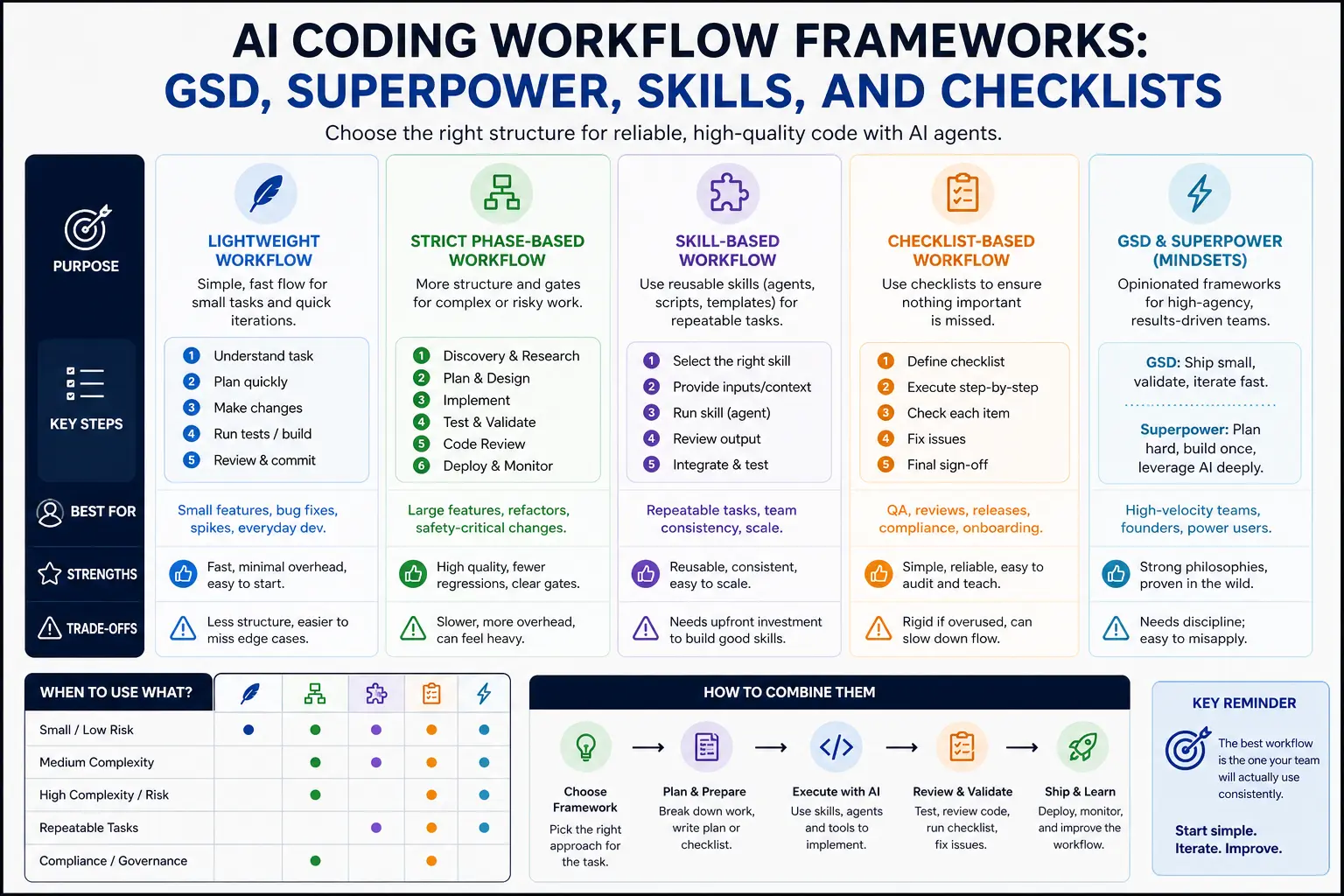
This article compares practical AI coding workflow frameworks. We will cover lightweight workflows, strict phase-based workflows, skill-based workflows, checklist-based workflows, and hybrid approaches. The goal is not to decide whether GSD, Superpower, skills, or checklists “win.” The goal is to choose the workflow structure that fits the task risk, team size, and codebase maturity.
The Problem: Agents Without Process Create Messy Diffs
Coding agents are powerful because they can operate across files, tools, commands, and context. That same power creates risk.
A human developer usually understands when a task is too broad, when to stop, when to ask for clarification, and when a diff is getting too large. An agent can miss those boundaries unless the workflow makes them explicit.
Common failure modes:
- the agent edits unrelated files;
- the agent refactors while fixing a small bug;
- the agent loosens types to silence errors;
- the agent changes tests to match broken behavior;
- the agent ignores existing patterns;
- the agent touches auth, billing, migrations, or CI without approval;
- the agent claims success without running the right checks;
- the agent produces a summary that sounds better than the diff actually is.
The fix is not one perfect prompt. The fix is a workflow.
What an AI Coding Workflow Framework Should Do
A good framework does not need to be complicated. It should answer six questions:
-
What is the task?
The agent needs a concrete goal and expected behavior. -
What context matters?
The agent should inspect relevant files, examples, docs, and tests, not the whole repository blindly. -
What is out of scope?
The agent needs boundaries: files, systems, dependencies, design changes, and risky areas. -
What is the plan?
For non-trivial work, the agent should propose a plan before editing. -
How do we verify the result?
Typecheck, lint, tests, build, manual QA, or review checklist. -
How do we review the diff?
The human should inspect changed files, risks, tests, and assumptions before merging.
Every framework in this article is just a different way to enforce those questions.
The Baseline Workflow: Issue → Plan → Edit → Test → Review
The simplest reliable workflow is:
issue → plan → edit → test → review
That is enough for many coding-agent tasks.
Example prompt:
txtCopyTask: Persist the selected dashboard filter in the URL query string.

Expected behavior:
- Selecting a filter updates `?status=`.
- Reloading keeps the selected filter.
- Invalid values fall back to `all`.

Constraints:
- Do not change dashboard layout.
- Do not add dependencies.
- Do not touch auth, billing, migrations, or CI.

Workflow:
1. Inspect the relevant files.
2. Propose a small plan before editing.
3. Make the minimal change after approval.
4. Add or update tests.
5. Run typecheck and relevant tests.
6. Summarize the diff and risks.
This is not a branded framework. It is the minimum process that keeps AI coding from turning into random edits.
Framework 1: Lightweight Workflow
A lightweight workflow is the fastest useful structure. It works well when the task is small and the risk is low.
Use it for:
- small UI fixes;
- simple copy changes;
- obvious type errors;
- small test additions;
- local component improvements;
- documentation updates;
- low-risk refactors in one file.
The lightweight workflow:
- Describe the task.
- Add constraints.
- Tell the agent what files to inspect.
- Let it edit.
- Run narrow checks.
- Review the diff.
Example:
txtCopyFix the empty state copy in `components/dashboard/EmptyState.tsx`.

Constraints:
- Do not change layout or styling.
- Do not edit unrelated files.
- Keep the copy under 80 characters.

After editing, show the diff summary.
The lightweight workflow is useful because it avoids bureaucracy. But it should only be used when the cost of a mistake is low and the diff is easy to review.
When Lightweight Workflow Fails
Lightweight workflows fail when the task is larger than it looks.
Warning signs:
- the agent needs to touch more than three files;
- the task involves business logic;
- tests are missing;
- the change touches shared utilities;
- the change affects data, auth, billing, permissions, or CI;
- the desired behavior is unclear;
- the agent starts refactoring unrelated code.
If you see those signs, stop and move to a stricter workflow.
A good prompt to regain control:
txtCopyPause editing. Summarize what changed so far, which files were touched, and why. Then propose a smaller plan before making any more changes.
Framework 2: Strict Phase-Based Workflow
A strict phase-based workflow separates the agent’s work into controlled stages. It is slower, but safer.
Use it for:
- multi-file refactors;
- business logic changes;
- database-adjacent work;
- code with weak tests;
- security-sensitive areas;
- PRs that multiple people will review;
- tasks where the agent has already produced messy diffs.
A strict workflow might look like this:
-
Discovery
Inspect relevant files. Do not edit. -
Plan
Explain current behavior, proposed change, files to modify, risks, and tests. -
Approval
Human approves, narrows, or rejects the plan. -
Implementation
Agent makes the smallest useful change. -
Validation
Agent runs tests, typecheck, lint, or build. -
Self-review
Agent reviews its own diff for unrelated changes and risks. -
Human review
Developer inspects the diff and decides what to merge.
Prompt:
txtCopyUse a strict phase-based workflow.

Phase 1: Discovery only. Do not edit files.
Inspect the relevant code and explain the current behavior.

Phase 2: Propose a plan with files, risks, and tests.
Wait for approval before editing.

Phase 3: After approval, implement the smallest change.

Phase 4: Run checks and review your own diff.
This workflow is especially useful with tools like Claude Code, Codex, Cursor Agent, or Copilot coding agents because it prevents the agent from jumping straight into broad edits.
Framework 3: Skill-Based Workflow
A skill-based workflow packages repeated procedures into reusable skills.
Use it when you perform the same coding task again and again:
- code review;
- small-scope refactor;
- writing tests;
- PR descriptions;
- article SEO checks;
- migration planning;
- frontend QA;
- release note generation.
Instead of pasting the same review checklist every time, create a skill.
Example folder:
txtCopyskills/
  code-review/
    SKILL.md
  write-tests/
    SKILL.md
  refactor-small-scope/
    SKILL.md
  frontend-qa/
    SKILL.md
Example SKILL.md:
mdCopy---
name: code-review
description: Review the current diff for bugs, missing tests, type safety issues, risky files, and unrelated edits.
---

# Code Review Skill

## Process
1. Inspect changed files.
2. Identify the purpose of the change.
3. Look for unrelated edits.
4. Check missing tests.
5. Check type safety.
6. Flag risky files.

## Output
Return findings by severity:
- blocker
- major
- minor
- question
- suggested test

Do not modify files unless explicitly asked.
Skill-based workflows are strong because they make repeated work consistent. They are weak when people create too many skills or let them become outdated.
Framework 4: Checklist-Based Workflow
A checklist-based workflow is simple and underrated. It works when you do not need a full skill, but you do need consistent review.
Use checklists for:
- pre-merge review;
- risky files;
- frontend QA;
- production readiness;
- migration review;
- article formatting;
- release preparation.
Example coding-agent checklist:
mdCopy## Coding Agent Review Checklist

- [ ] Task is clearly defined.
- [ ] Diff is limited to the requested scope.
- [ ] No unrelated formatting changes.
- [ ] No new dependency added without reason.
- [ ] No `any` added to hide TypeScript errors.
- [ ] Tests were added or updated when behavior changed.
- [ ] Typecheck/lint/tests were run or skipped with explanation.
- [ ] Auth, billing, permissions, migrations, CI, and secrets were not changed unexpectedly.
- [ ] Manual QA steps are listed.
Checklists are good for teams because humans can use them too. A checklist is not tied to one tool. It works with Claude Code, Codex, Cursor, Copilot, or manual development.
Framework 5: GSD-Style Workflow
A GSD-style workflow is about getting a task done with minimal overhead. The idea is not to create a formal system. The idea is to turn a clear issue into a finished diff quickly.
Use a GSD-style workflow when:
- the task is small;
- the goal is clear;
- the code area is familiar;
- the risk is low;
- the test path is obvious;
- you need speed more than formal process.
A GSD-style prompt:
txtCopyGet this done with the smallest safe change.

Task: Add an empty-state message when the lead list has no records.

Rules:
- Inspect the existing list component first.
- Reuse existing empty-state styles.
- Do not change data fetching.
- Do not add dependencies.
- Show the final diff summary.
This workflow is useful for momentum. The risk is that people use it for tasks that are not actually small.
If the agent needs to plan architecture, update tests, touch shared utilities, or make product decisions, GSD is the wrong mode.
Framework 6: Superpower-Style Workflow
A Superpower-style workflow is stricter and more systemized. The goal is to make agent work predictable by using phases, context files, skills, checklists, and review gates.
Use it when:
- the codebase is large;
- the task has risk;
- multiple agents or developers may work in parallel;
- the team needs repeatability;
- onboarding consistency matters;
- the diff will go through serious review.
A Superpower-style structure might include:
AGENTS.mdfor project rules;- skills for repeated workflows;
- task specs with acceptance criteria;
- phase-based prompts;
- code review checklist;
- test commands;
- protected file list;
- final human review.
Example:
txtCopyUse the refactor-small-scope skill.

Read:
- AGENTS.md
- docs/repo-map.md
- docs/specs/dashboard-filter-url-state.md

Process:
1. Discovery only. Do not edit.
2. Propose a plan.
3. Wait for approval.
4. Implement the smallest change.
5. Run tests.
6. Use the code-review skill on your diff.
7. Summarize risks and manual QA.
The risk of Superpower-style workflows is bureaucracy. If every tiny copy edit needs three specs and two skills, developers will stop using the system.
Comparison Table
| Framework | Best for | Strength | Risk |
|---|---|---|---|
| Lightweight workflow | Small low-risk changes | Fast and simple | Too loose for complex work |
| Strict phase-based workflow | Multi-file or risky work | Strong control and review | Slower |
| Skill-based workflow | Repeated procedures | Consistent output | Skills can become stale |
| Checklist-based workflow | Review and QA | Tool-independent and easy | Can become checkbox theater |
| GSD-style workflow | Quick scoped execution | Momentum | Misused for broad tasks |
| Superpower-style workflow | Serious agentic engineering | Repeatable and safer | Bureaucracy if overused |
The best teams do not use one framework for everything. They switch based on task risk.
Decision Table: Which Workflow Should You Use?
| Situation | Recommended workflow |
|---|---|
| One-file UI copy change | Lightweight or GSD-style |
| Small bug with clear repro | Lightweight plus tests |
| Multi-file refactor | Strict phase-based |
| Repeated code review | Skill-based plus checklist |
| Writing tests for changed logic | Skill-based |
| Auth, billing, permissions, migrations | Strict phase-based with human approval |
| Article object formatting | Skill-based checklist |
| New feature with unclear requirements | Discovery and planning before coding |
| Large codebase with multiple agents | Superpower-style workflow |
| Early prototype | Lightweight, but keep git clean |
This table is the practical answer. The workflow should match the risk.
How to Choose Based on Risk
Use three risk levels.
Low risk:
- local UI copy;
- docs;
- small component fix;
- isolated test addition.
Use lightweight workflow.
Medium risk:
- shared utility change;
- data transformation;
- multi-file refactor;
- API contract change;
- component behavior change.
Use phase-based workflow or skill-based workflow.
High risk:
- auth;
- billing;
- payments;
- permissions;
- database migrations;
- CI/CD;
- customer data;
- destructive actions.
Use strict phases, approval gates, and human review. In many cases, the agent should only investigate, draft, or write tests, not perform the final change autonomously.
How to Avoid Bureaucracy
A workflow should reduce chaos, not slow everything down.
Avoid bureaucracy by following these rules:
- use the smallest workflow that fits the risk;
- do not require plans for trivial edits;
- do not create skills for one-time tasks;
- keep checklists short;
- delete stale rules;
- avoid duplicating the same instruction in five files;
- make review gates explicit only for risky work;
- measure whether the workflow improves review quality.
The goal is not process for its own sake. The goal is better diffs.
A useful question:
txtCopyWill this workflow make the final diff smaller, safer, or easier to review?
If the answer is no, simplify it.
The Role of AGENTS.md, Rules, and Custom Instructions
Workflow frameworks work better when the project has stable guidance.
Use AGENTS.md, Cursor rules, CLAUDE.md, or GitHub Copilot custom instructions to store:
- setup commands;
- test commands;
- repo map;
- coding conventions;
- risky files;
- definition of done;
- safety rules.
AGENTS.md describes itself as a README for agents: a predictable place to provide context and instructions for AI coding agents. GitHub Copilot custom instructions give Copilot additional context on how to understand a project and how to build, test, and validate changes. Cursor Rules provide persistent project, team, and user guidance.
Do not put the whole workflow in every prompt. Store stable context once, then choose the right workflow for the task.
Practical Starter Setup
For a small team or solo developer, start with this:
txtCopyAGENTS.md
skills/
  code-review/
    SKILL.md
  write-tests/
    SKILL.md
  refactor-small-scope/
    SKILL.md
checklists/
  agent-review.md
  frontend-qa.md
Then use this operating rule:
txtCopyLow-risk task → lightweight workflow
Medium-risk task → skill or phase-based workflow
High-risk task → strict workflow with human approval
Repeated task → skill
Review task → checklist
This setup is enough for most projects. Add more structure only when you see repeated failures.
Example: Same Task, Different Workflows
Task: persist the selected dashboard filter in the URL.
Lightweight version:
txtCopyUpdate `StatusFilter.tsx` so selected status persists in `?status=`. Do not change layout. Add or update a small test. Run typecheck.
Strict version:
txtCopyDiscovery only first. Inspect `StatusFilter.tsx`, `lib/url-state.ts`, and one existing URL-state example. Explain current behavior and propose a plan. Wait for approval before editing. After approval, make the minimal change, add tests, run typecheck, and review your diff.
Skill-based version:
txtCopyUse the refactor-small-scope skill, then the write-tests skill, then the code-review skill. The task is to persist selected dashboard status in the URL. Follow `AGENTS.md` and do not change dashboard layout.
All three can work. The right one depends on codebase risk, team standards, and how much review you need.
What to Track Over Time
If you use coding agents regularly, track the workflow quality.
Useful signals:
- average number of files changed;
- percentage of diffs with unrelated edits;
- tests added per behavior change;
- how often agents touch risky files;
- how often humans request major rewrites;
- how often builds fail after agent changes;
- time saved vs review time added;
- repeated mistakes that should become rules or skills.
If agents keep making the same mistake, do not just complain. Turn the correction into project guidance, a skill, or a checklist.
If a workflow adds more time than it saves, simplify it.
Common Mistakes
Avoid these mistakes:
- using GSD-style prompts for high-risk work;
- creating a huge phase system for tiny edits;
- letting skills become stale;
- using checklists without actually reviewing the diff;
- treating agent summaries as proof;
- allowing agents to edit auth, billing, migrations, or CI without approval;
- skipping tests because the agent says the change is simple;
- storing contradictory rules across tools.
The best workflow is not the most complex one. It is the one that reliably produces reviewable diffs.
Final Recommendation
Use a tiered approach:
- Lightweight workflow for small, low-risk tasks.
- Strict phase-based workflow for multi-file or risky work.
- Skill-based workflow for repeated procedures.
- Checklist-based workflow for review and QA.
- GSD-style workflow when speed matters and scope is clear.
- Superpower-style workflow when repeatability, team coordination, or risk control matters more than speed.
This gives you flexibility without chaos.
The point is not to turn every AI coding session into a ceremony. The point is to stop treating agents like magic autocomplete and start treating them like fast collaborators who need context, boundaries, tests, and review.
Conclusion: Workflow Is the Real Coding Agent Superpower
AI coding agents are getting better, but better models do not remove the need for process.
A capable agent without a workflow can create chaos faster. A capable agent inside a clear workflow can produce useful, reviewable changes.
Start simple: issue, plan, edit, test, review.
Add skills when a task repeats. Add checklists when review quality matters. Add strict phases when risk increases. Add more structure only when the current process fails.
That is how AI coding workflows stay practical: enough process to prevent chaos, not so much process that nobody uses it.